> For the complete documentation index, see [llms.txt](https://www.docpartner.dev/llms.txt). Markdown versions of documentation pages are available by appending `.md` to page URLs; this page is available as [Markdown](https://www.docpartner.dev/api/mail-partner/gestion-des-webhooks.md).
# Webhooks
Gérer les statuts de vos campagnes mails
Après l’envoi d’une campagne, Mail Partner vous permet de recevoir des statuts via des webhooks.\
Pour en savoir plus, [**contactez nous**](https://www.mailpartner.fr/contact).
{% hint style="info" %}
#### À noter
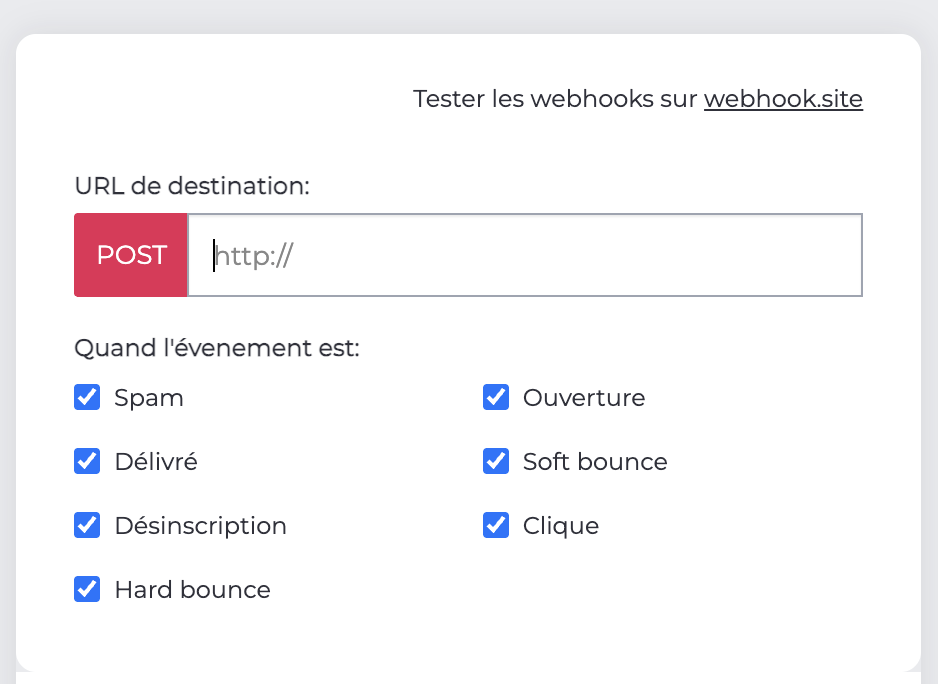
Pour recevoir les statuts, vous devez paramétrer vos URLs de webhook
dans votre onglet [API MAil](https://my.mailpartner.fr/dashboard/webhooks/liste)
{% endhint %}
**Les différents statuts sont:**
* **Delivered :** L'email a été accepté par le serveur de messagerie du destinataire. Cela indique un succès dans la livraison.
* **Hard-Bounce :** Échec permanent et définitif de la livraison. Cela signifie que l'adresse email n'existe pas, est mal orthographiée, ou que le domaine est invalide. L'adresse doit être retirée de votre liste.
* **Soft-Bounce :** Échec temporaire de la livraison. Les raisons peuvent inclure une boîte de réception pleine, un serveur temporairement en panne ou un message trop volumineux. Un nouvel envoi peut être tenté ultérieurement.
* **Open :** Indique que le destinataire a ouvert l'email, généralement mesuré par le chargement d'un pixel invisible. Cela suggère l'engagement et l'efficacité de l'objet et de l'aperçu de l'email.
* **Click :** Signifie que le destinataire a cliqué sur un ou plusieurs liens au sein de l'email. Cela reflète un engagement élevé et un intérêt pour le contenu de l'email.
* **Unsubscribe :** Le destinataire a cliqué sur le lien de désabonnement, indiquant qu'il ne souhaite plus recevoir d'emails. Il est crucial de traiter cette demande immédiatement en retirant l'adresse de votre liste d'envoi.
* **Spam :** L'email a été marqué comme spam ou bloqué par un filtre anti-spam. Cela nuit gravement à votre réputation d'expéditeur et nécessite de traiter l'adresse comme un désabonnement forcé.
**Exemple de statut JSON envoyé en POST**
```json
{
"hook": "open",
"datas": {
"op": "open",
"at": 1764770972,
"from": "monemail@email.com",
"message_id": "xxxxxx"
}
}
```
```json
{
"hook": "open",
"datas": {
"op": "first_open",
"at": 1764770972,
"from": "monemail@email.com",
"message_id": "xxxxxx"
}
}
```
```json
{
"hook": "delivered",
"datas": {
"op": "delivered",
"at": 1764770972,
"from": "monemail@email.com",
"message_id": "xxxxxx"
}
}
```
```json
{
"hook": "click",
"datas": {
"op": "click",
"at": 1764770972,
"from": "monemail@email.com",
"message_id": "xxxxxx"
}
}
```
```json
{
"hook": "hard-bounce",
"datas": {
"op": "hard-bounce",
"at": 1764770972,
"from": "monemail@email.com",
"message_id": "xxxxxx"
}
}
```
```json
{
"hook": "soft-bounce",
"datas": {
"op": "soft-bounce",
"at": 1764770972,
"from": "monemail@email.com",
"message_id": "xxxxxx"
}
}
```
##
---
# Agent Instructions
This documentation is published with GitBook. GitBook is the documentation platform designed so that both humans and AI agents can read, navigate, and reason over technical content effectively. Learn more at gitbook.com.
## Querying This Documentation
If you need additional information that is not directly available in this page, you can query the documentation dynamically by asking a question.
Perform an HTTP GET request on the current page URL with the `ask` query parameter, and the optional `goal` query parameter:
```
GET https://www.docpartner.dev/api/mail-partner/gestion-des-webhooks.md?ask=&goal=
```
`ask` is the immediate question: it should be specific, self-contained, and written in natural language.
`goal` is optional and describes the broader end goal you are ultimately trying to accomplish on behalf of the user. GitBook uses it to tailor the answer towards what is most useful for that goal.
The response will contain a direct answer to the question and relevant excerpts and sources from the documentation.
Use this mechanism when the answer is not explicitly present in the current page, you need clarification or additional context, or you want to retrieve related documentation sections.